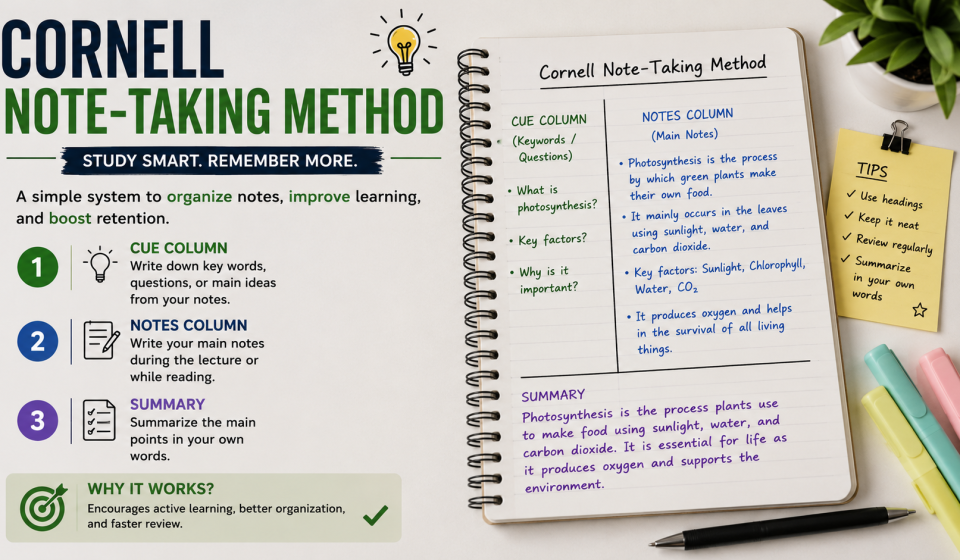

Introduction to the Cornell Note-Taking Method
The Cornell Note-Taking Method is one of the most effective and structured systems for organizing study notes. Developed in the 1940s by Walter Pauk, an education professor at Cornell University, this method was designed to help students not only record information during lectures but also actively process and review it later.
Unlike traditional note-taking, where students simply write down everything they hear, the Cornell system encourages understanding, summarization, and recall. It transforms passive listening into active learning, which significantly improves memory retention and academic performance.
In today’s fast-paced education environment—where students deal with heavy coursework, online classes, and digital distractions—the Cornell method remains highly relevant. It helps students study smarter, not harder.
Structure of the Cornell Note-Taking Method
The Cornell system divides each page into three main sections:
1. Notes Column (Right Side)
This is the largest section of the page. Here, you write down lecture notes, important ideas, facts, diagrams, and explanations. The goal is not to write every word but to capture meaningful points in your own words.
2. Cue Column (Left Side)
This narrow column is used after the lecture. You write keywords, questions, or cues that relate to the notes on the right side. These cues help trigger memory and are essential for revision.
3. Summary Section (Bottom)
At the bottom of the page, you write a short summary of the entire page in 2–4 sentences. This forces you to process and understand the information rather than just copy it.
How to Use the Cornell Note-Taking Method Step-by-Step
Step 1: Prepare Your Page
Divide your notebook page into three sections:
- Left: Cue column (around 2.5 inches)
- Right: Notes column (largest section)
- Bottom: Summary section (about 2 inches)
You can also use digital templates in apps like Notion, OneNote, or Google Docs.
Step 2: Take Notes During Lecture
While attending a class or watching a lecture:
- Write main ideas in the right column
- Use bullet points instead of long paragraphs
- Focus on understanding instead of copying
- Leave space for later additions
Step 3: Add Cues After Class
After the lecture ends:
- Review your notes
- Write keywords or questions in the left column
- Example:
- Notes: “Photosynthesis occurs in chloroplasts”
- Cue: “Where does photosynthesis happen?”
This step improves recall and self-testing.
Step 4: Write the Summary
At the bottom of the page:
- Summarize the entire page in your own words
- Focus on key ideas and relationships
- Keep it short but meaningful
Step 5: Review Regularly
The Cornell method is most powerful when used for revision:
- Cover the notes and try answering cues
- Use spaced repetition (revise after 1 day, 1 week, 1 month)
- Self-test instead of rereading
Benefits of the Cornell Note-Taking Method
1. Improves Memory Retention
By actively engaging with material, students remember information longer compared to passive reading.
2. Enhances Understanding
Summarizing and questioning forces deeper thinking rather than memorization.
3. Makes Revision Easier
All key information is organized on structured pages, making exam preparation faster.
4. Boosts Active Learning
Students interact with their notes through cues and summaries, improving learning efficiency.
5. Reduces Study Stress
Well-organized notes reduce last-minute confusion during exams.
When to Use the Cornell Method
The Cornell system is versatile and can be used in multiple situations:
- Classroom lectures
- Online courses
- Self-study sessions
- Reading textbooks
- Research and assignments
It is especially useful for subjects that involve a lot of concepts, such as biology, history, psychology, and business studies.
Common Mistakes to Avoid
1. Writing Too Much
Many students try to write everything. This defeats the purpose of structured learning.
2. Skipping the Cue Column
Without cues, revision becomes passive and less effective.
3. Ignoring Summaries
Summaries are essential for understanding the big picture.
4. Not Reviewing Regularly
The system works only when you actively revise your notes.
Digital Cornell Note-Taking Tools
Modern students can use digital tools to apply the Cornell method efficiently:
- Microsoft OneNote (built-in Cornell templates)
- Notion (custom note databases)
- Google Docs (manual table setup)
- Evernote (structured notebooks)
Digital notes also allow searchability, cloud storage, and easy editing.
Cornell Method vs Traditional Note-Taking
| Feature | Traditional Notes | Cornell Method |
|---|---|---|
| Structure | Unorganized | Structured format |
| Revision | Difficult | Easy and fast |
| Learning Style | Passive | Active |
| Retention | Moderate | High |
The Cornell system clearly provides a more effective learning experience.
Practical Example of Cornell Notes
Topic: Water Cycle
- Notes Column:
- Evaporation turns water into vapor
- Condensation forms clouds
- Precipitation returns water to Earth
- Cue Column:
- What is evaporation?
- How are clouds formed?
- What is precipitation?
- Summary:
The water cycle describes how water moves through evaporation, condensation, and precipitation, continuously recycling water on Earth.
Source
https://sl1nk.com/y5ex7tb
https://sl1nk.com/nnufzyo
Conclusion
The Cornell Note-Taking Method is more than just a note-writing system—it is a complete learning strategy. By dividing information into structured sections and actively engaging with content, students can significantly improve understanding, retention, and exam performance.
In a world full of distractions and overwhelming study material, this method brings clarity and discipline to learning. Whether you are a school student, college learner, or self-learner, adopting the Cornell system can transform the way you study and help you achieve better academic results.
FAQs
1. What is the Cornell Note-Taking Method?
It is a structured note-taking system that divides notes into cues, main notes, and summaries for better learning and revision.
2. Who invented the Cornell Method?
It was developed by Walter Pauk at Cornell University in the 1940s.
3. Is the Cornell Method suitable for all subjects?
Yes, it works best for theory-heavy subjects but can also be used in technical fields.
4. Can I use the Cornell Method digitally?
Yes, apps like Notion, OneNote, and Google Docs support Cornell-style formatting.
5. Why is the Cornell Method better than regular notes?
Because it improves organization, memory retention, and active recall through structured learning.