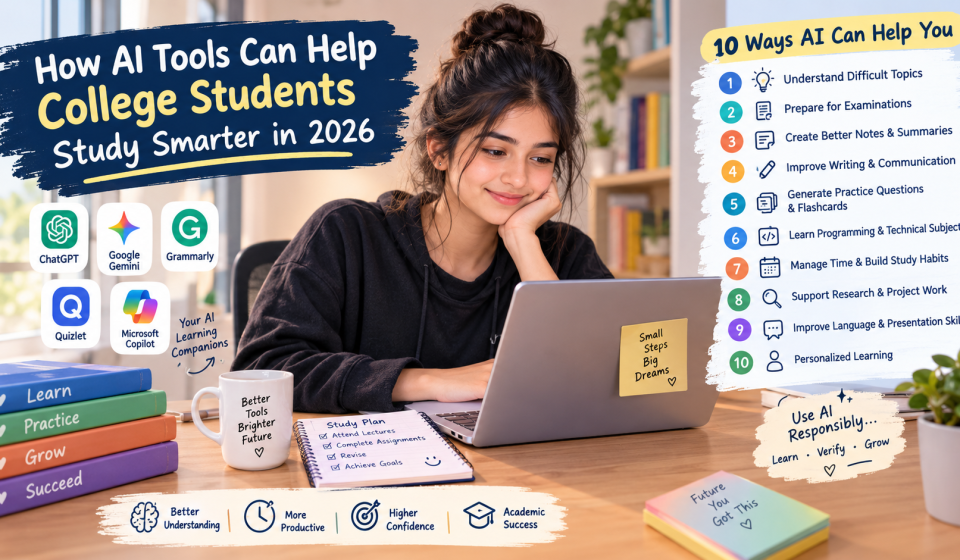

Discover how AI tools help college students study smarter in 2026. Explore the best AI tools for learning, exam preparation, note-taking, and productivity.
Artificial intelligence (AI) is changing the way college students learn, prepare for examinations, complete assignments, and manage their academic responsibilities. In 2026, AI-powered tools are becoming useful learning companions that can help students understand difficult concepts, organize study materials, improve writing skills, and prepare for exams more efficiently.
College life can be challenging. Students often need to manage lectures, practical assignments, projects, examinations, internships, and personal responsibilities at the same time. Traditional study methods remain important, but AI tools can provide additional support by making learning more interactive, flexible, and personalized.
From AI chatbots and writing assistants to intelligent note-taking applications and practice quiz generators, students have access to various technologies that can support their education. However, using these tools effectively requires critical thinking, responsible decision-making, and an understanding of their limitations.
In this article, we will explore how AI tools can help college students study smarter in 2026, which tasks they can support, their benefits and challenges, and practical ways to use them for academic success.
What Are AI Tools for College Students?
AI tools are software applications that use artificial intelligence to perform tasks such as answering questions, generating explanations, summarizing information, analyzing text, and assisting with problem-solving.
For college students, these tools can function as learning assistants. They can explain complicated subjects in simpler language, generate practice questions, suggest study schedules, and provide feedback on written work.
For example, a computer science student who struggles to understand programming concepts can ask an AI assistant to explain a topic step by step. Similarly, a business student can use AI to review management concepts, practice case studies, or prepare presentation outlines.
AI tools do not replace teachers, textbooks, or independent learning. Instead, they can supplement traditional educational resources and help students identify areas where they need additional practice.
10 Ways AI Tools Can Help College Students Study Smarter in 2026
Understand Difficult Topics More Easily
One of the most useful applications of AI in education is simplifying difficult concepts.
College textbooks and lecture notes sometimes contain technical terminology, complex explanations, and unfamiliar examples. Students may need additional explanations before they fully understand a topic.
AI assistants can explain concepts at different levels of difficulty. Students can request beginner-friendly explanations, practical examples, comparisons, or step-by-step solutions.
For example, a student learning database management systems can ask an AI assistant to explain primary keys, foreign keys, and database relationships using a simple college management system as an example.
This approach can make abstract concepts easier to understand.
Practical tip: Ask the AI tool to explain a topic in simple language, provide two real-life examples, and finish with five questions to test your understanding.
Prepare for College Examinations
Preparing for examinations requires regular revision, practice, and a clear understanding of the syllabus. AI tools can help students organize their preparation more effectively.
Students can use AI to create revision plans, generate practice questions, summarize their notes, and identify topics that need additional attention.
For example, if an examination is scheduled in seven days, a student can provide the syllabus and ask for a realistic revision timetable that divides the chapters across the available days.
AI can also generate multiple-choice questions and short-answer questions for self-assessment.
However, students should compare AI-generated questions and answers with their official syllabus, textbooks, and classroom notes. AI-generated material may contain mistakes or omit important details.
Create Better Study Notes and Summaries
Taking effective notes is an essential academic skill. However, lengthy lectures, textbooks, and research materials can make revision time-consuming.
AI tools can help convert large amounts of information into organized summaries, key points, definitions, and revision notes.
For example, students can provide their own lecture notes and request a summary organized under clear headings. They can also ask for important definitions, examples, and potential examination questions.
This can be especially helpful when reviewing lengthy chapters before an examination.
Students should avoid relying exclusively on short summaries. Important explanations, examples, formulas, and details required by their course may be missing.
Practical tip: Use AI to organize your notes, then review the original material and add any missing information before studying.
Improve Writing and Communication Skills
College students regularly prepare assignments, reports, presentations, project documentation, emails, and internship applications.
AI writing assistants can help students improve grammar, sentence structure, clarity, and organization.
For example, a student who struggles with English can write a paragraph and ask an AI assistant to correct grammatical errors while explaining the changes.
AI can also help students develop essay outlines, improve presentation structure, and practice professional communication.
Nevertheless, students should develop their own writing abilities instead of copying AI-generated content without understanding it.
When preparing academic assignments, follow the institution’s rules regarding AI assistance, citations, and original work.
Generate Practice Questions and Flashcards
Reading notes repeatedly does not always reveal whether a student genuinely understands the material. Testing yourself is another useful way to identify knowledge gaps.
AI tools can generate practice questions, flashcards, quizzes, and mock tests from a student’s study materials.
For example, a student studying business communication can request ten multiple-choice questions, five short-answer questions, and three long-answer questions based on a chapter.
After answering, the student can compare their responses with explanations and revisit the concepts they misunderstood.
Flashcards are particularly useful for memorizing definitions, formulas, technical terminology, and important dates.
To improve the learning experience, students should attempt questions independently before looking at the answers.
Learn Programming and Technical Subjects
Students studying information technology, computer science, engineering, and related subjects can use AI tools to support practical learning.
AI assistants can explain programming syntax, clarify error messages, demonstrate algorithms, and help students understand how code works.
For example, a beginner learning HTML and CSS can ask for an explanation of semantic HTML elements or the difference between Flexbox and CSS Grid.
A Python student can request a simple example of loops, functions, dictionaries, or file handling.
AI can also help students interpret error messages and understand why a program is not working as expected.
However, copying code without understanding it can create problems during practical examinations, interviews, and real-world projects.
Practical tip: Ask the AI assistant to explain each line of code, identify common mistakes, and give you a similar exercise to solve independently.
Manage Time and Build Better Study Habits
Managing time is a common challenge for college students, particularly when assignments, examinations, internships, and personal responsibilities overlap.
AI tools can help students build structured study schedules based on their subjects, deadlines, available hours, and priorities.
For example, a student can request a daily timetable that includes college classes, two focused study sessions, assignment work, revision, and breaks.
AI can also help divide large tasks into smaller steps. Instead of planning to complete an entire project in one day, students can create separate tasks for research, outlining, drafting, editing, and final review.
A realistic schedule should include flexibility for unexpected responsibilities and sufficient time for rest.
The goal is not to study continuously but to make study time more focused and productive.
Support Research and Project Work
Research projects, presentations, and assignments require students to gather information, compare ideas, and organize their findings.
AI tools can help students brainstorm research questions, understand unfamiliar terminology, organize an outline, and identify areas for further investigation.
For example, a college student preparing a project on the impact of artificial intelligence in education can use AI to develop research questions and organize the project into logical sections.
However, AI-generated references and factual claims should always be verified.
Students should consult reliable sources such as academic journals, official government websites, university publications, and recognized research organizations.
They should also cite the original sources they actually consult rather than treating an AI-generated bibliography as automatically accurate.
Improve Language Learning and Presentation Skills
Communication skills are important for academic success, internships, and future employment.
AI tools can help students practice English, improve vocabulary, understand grammar, and prepare for presentations or interviews.
Students can ask an AI assistant to conduct a mock interview, ask questions one at a time, and provide feedback on their written responses.
They can also practice explaining academic topics in simple English and request corrections when their sentences are unclear.
For presentations, AI can help organize ideas into an introduction, main discussion, and conclusion.
Students should use this feedback as a learning opportunity and practice speaking independently to build confidence.
Support Personalized Learning
Every student learns differently. Some understand concepts through examples, while others prefer diagrams, written explanations, demonstrations, or practice exercises.
AI tools can adapt explanations to a student’s questions and requested learning level.
For example, a student who finds a mathematical formula confusing can request a simpler explanation, a worked example, and a similar problem to solve independently.
ChatGPT’s Study Mode is one example of a learning feature designed to guide students through concepts step by step, ask questions, and check their understanding.
Personalized explanations can help students focus on their individual learning needs rather than following the same approach for every topic.
However, students should verify important information and consult teachers when concepts remain unclear.
Best AI Tools for College Students in 2026
Different AI tools support different academic tasks. Students should select tools according to their needs, budget, privacy requirements, and college policies.
ChatGPT
ChatGPT can help students understand difficult concepts, practice questions, organize study notes, brainstorm project ideas, and prepare for examinations.
Its Study Mode can guide learners through problems step by step instead of simply providing final answers.
Google Gemini
Google Gemini can assist with brainstorming, explanations, writing support, and exploring ideas. Students should verify factual claims and check important information against reliable sources.
Grammarly
Grammarly provides writing assistance, including grammar, spelling, clarity, and style suggestions. It can help students review essays, reports, and professional emails.
Quizlet
Quizlet offers study resources such as flashcards and practice activities. Students can use these features to review definitions, terminology, and other course material. Available features may depend on the plan and current product offering.
Microsoft Copilot
Microsoft Copilot can assist with questions, brainstorming, summarization, and other productivity tasks. Features and integrations depend on the version and access available to the student.
Important: Students should review each tool’s current pricing, features, privacy policy, and usage limits before relying on it.
Benefits of Using AI Tools for College Studies
When used responsibly, AI tools can provide several benefits.
- Personalized explanations: Students can request help at their preferred learning level.
- Efficient revision: Summaries and practice questions can make revision more organized.
- Improved productivity: AI can help students plan tasks and structure assignments.
- Writing support: Grammar and clarity suggestions can improve communication.
- Independent practice: Students can test their understanding outside classroom hours.
- Technical assistance: Programming learners can explore examples and understand errors.
- Better organization: Study schedules and task lists can help students manage deadlines.
These benefits depend on how students use the tools. AI cannot guarantee better grades, and students still need consistent effort, independent practice, and a sound understanding of their subjects.
Challenges and Risks of Using AI in Education
Despite its advantages, AI also presents important challenges.
1. Incorrect Information
AI systems can produce incorrect facts, misleading explanations, or fabricated references. Students should verify important claims using textbooks, academic publications, and official sources.
2. Overdependence on AI
Relying on AI for every answer can weaken independent problem-solving and critical-thinking skills. Students should attempt questions themselves before requesting assistance.
3. Academic Integrity
Submitting AI-generated work as entirely one’s own may violate college rules. Students should understand their institution’s AI policy, acknowledge assistance when required, and complete assessments honestly.
4. Privacy Concerns
Students should avoid uploading passwords, identification documents, confidential college records, personal information, or unpublished research that they are not authorized to share.
They should review a tool’s privacy settings and terms before uploading documents.
5. Unequal Access
Not all students have access to reliable internet connections, suitable devices, or paid AI subscriptions. Free resources, textbooks, libraries, and teacher support remain important alternatives.
How to Use AI Tools Responsibly: A Practical Study Method
Students can follow a simple process to get more value from AI tools.
Step 1: Start with your syllabus. Identify the chapters and learning objectives you need to cover.
Step 2: Study the original material. Read your textbook, attend lectures, and review your notes before asking AI for additional help.
Step 3: Ask specific questions. Instead of asking for everything about a subject, focus on one concept or problem at a time.
Step 4: Practice independently. Solve questions, write answers, or explain concepts without looking at the AI-generated response.
Step 5: Check your understanding. Ask for a quiz or request feedback on your answers.
Step 6: Verify important information. Compare explanations with reliable educational resources.
Step 7: Follow academic rules. Use AI as a learning assistant and respect your college’s requirements for original work and disclosure.
This method encourages students to participate actively in learning instead of depending on automatically generated answers.
source
Conclusion
AI tools can help college students study smarter in 2026 by making difficult concepts easier to understand, supporting examination preparation, improving writing skills, organizing study schedules, and providing opportunities for independent practice.
Tools such as ChatGPT, Google Gemini, Grammarly, Quizlet, and Microsoft Copilot offer different types of assistance that students can explore according to their academic needs.
However, AI should complement traditional learning rather than replace it. Students must verify information, protect their privacy, follow academic integrity rules, and continue developing their own analytical and problem-solving abilities.
The most effective approach is to use AI with a clear learning objective. Ask questions, practice independently, review mistakes, and apply what you learn to real academic problems.
Ultimately, studying smarter does not mean avoiding effort. It means using suitable resources, managing time effectively, and building a deeper understanding of the subjects that matter for your education and future career.
Frequently Asked Questions (FAQs)
1. How can AI tools help college students study smarter?
AI tools can explain difficult concepts, summarize notes, generate practice questions, improve writing, assist with research, and help students organize study schedules.
2. What is the best AI tool for college students in 2026?
The best tool depends on the student’s needs. ChatGPT can support explanations and practice, Grammarly can assist with writing, and other tools may be useful for research, productivity, or flashcards.
3. Can AI tools help students prepare for exams?
Yes. Students can use AI to create revision plans, generate practice questions, explain difficult topics, and test their understanding. They should verify answers using official course materials.
4. Are AI tools free for college students?
Some AI tools offer free access, while others provide paid subscriptions or restrict certain features. Students should check the current pricing and usage limits on each tool’s official website.
5. Can AI tools help students learn programming?
Yes. AI tools can explain programming concepts, demonstrate code examples, help interpret errors, and provide practice exercises. Students should understand and test code instead of copying it without learning.
6. Is it safe to use AI for college assignments?
AI can be used responsibly for brainstorming, explanations, and editing, provided students follow their college’s rules. They should avoid plagiarism, verify information, and disclose AI assistance when required.
7. Can AI replace teachers or college professors?
No. AI can provide additional explanations and practice opportunities, but teachers offer educational guidance, subject expertise, human interaction, and assessment that AI cannot fully replace.
8. How can students avoid becoming dependent on AI?
Students should attempt problems independently, use AI for hints and explanations, verify answers, and practice recalling information without assistance.
9. Can AI improve students’ time management?
AI can help create study timetables, prioritize tasks, divide projects into smaller steps, and plan revision sessions. Students must follow and adjust their schedules consistently.
10. What is the future of AI in college education?
AI is likely to continue influencing personalized learning, educational support, research, and digital productivity. Responsible use, privacy protection, critical thinking, and human guidance will remain important as these technologies develop.