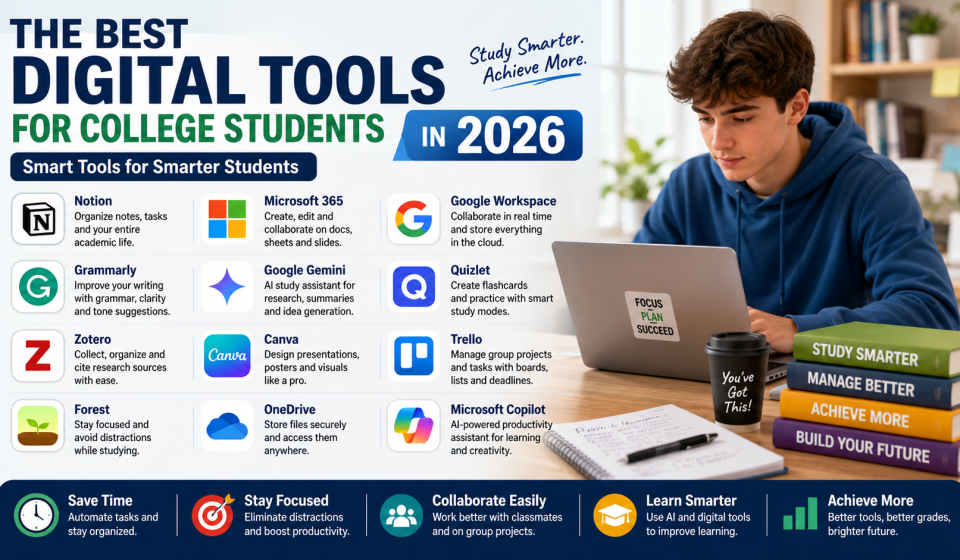

College students in 2026 need more than textbooks and notebooks to succeed. With online classes, digital assignments, AI-powered learning, research projects, presentations, and group work, the right digital tools can save time and improve academic performance. These tools help students organize tasks, write better, manage deadlines, take notes, study smarter, and collaborate with classmates.
Why Digital Tools Matter for College Students
College life is busy. Students must attend lectures, complete assignments, prepare for exams, manage personal responsibilities, and sometimes work part-time jobs. Digital tools make these tasks easier by keeping everything in one place.
A good app can remind students about deadlines, store lecture notes, organize files, correct writing mistakes, support research, and help with presentations. Tools like Notion, Microsoft 365, Grammarly, and AI assistants are now commonly used in education because they improve productivity and learning support. Notion offers education plans for students and teachers, Microsoft provides Office 365 Education for eligible students, and Grammarly supports academic writing with real-time feedback.
1. Notion for Study Planning and Organization
Notion is one of the most useful tools for college students who want to organize their academic life. Students can create dashboards for subjects, assignments, exam dates, class notes, habit tracking, and project planning.
It works like a digital workspace where everything can be stored in one place. Students can create to-do lists, calendars, reading trackers, and weekly study plans. Notion’s education plan is available for eligible students and teachers using an education email, making it a popular option for academic organization.
2. Microsoft 365 for Assignments and Presentations
Microsoft 365 remains one of the best digital toolkits for college students. Word helps with assignments and essays, Excel is useful for data, budgets, and calculations, and PowerPoint helps students create presentations.
OneDrive allows students to store files online and access them from different devices. Microsoft says eligible students and educators can access Office 365 Education for free using a valid school email address.
3. Google Workspace for Collaboration
Google Docs, Sheets, Slides, Drive, and Calendar are excellent for group projects and online learning. Students can work on the same document at the same time, leave comments, share files, and track changes.
Google Drive is useful for storing notes, PDFs, assignments, and presentation files. Google Calendar helps students manage class schedules, exam dates, and project deadlines. For group assignments, Google Workspace tools are simple, fast, and easy to use.
4. Grammarly for Better Academic Writing
Writing is a major part of college life. Students often need to write essays, reports, emails, research papers, and project summaries. Grammarly helps improve grammar, clarity, tone, and sentence structure.
Grammarly for students offers real-time writing feedback and AI writing support. It can help students revise drafts, improve readability, and write with more confidence. However, students should always follow college rules about AI use and academic honesty. Grammarly also highlights ways to disclose AI use responsibly.
5. Google Gemini and AI Study Assistants
AI tools are becoming important for college students in 2026. Google Gemini can help students brainstorm ideas, summarize difficult topics, create study plans, explain concepts, and support writing practice.
AI assistants can be useful when students need quick explanations or help understanding complex material. However, students should not copy AI answers directly into assignments. AI should be used as a study partner, not as a shortcut.
Microsoft also provides Copilot tools for education, including Copilot Chat and Microsoft 365 Copilot features designed to support teaching, productivity, and learning workflows.
6. Quizlet for Flashcards and Exam Revision
Quizlet is helpful for students who need to memorize definitions, formulas, vocabulary, dates, and key concepts. Students can create digital flashcards and practice using quizzes and review modes.
Flashcards are useful because they encourage active recall. Instead of only reading notes, students test themselves. This improves memory and exam preparation. Quizlet is especially helpful for language learning, biology, law, medicine, history, and technical subjects.
7. Zotero for Research and Citations
Research papers require proper sources and citations. Zotero is a useful tool for collecting research articles, organizing references, and creating citations.
Students can save books, journal articles, websites, and PDFs in one library. Zotero helps reduce citation mistakes and saves time when writing academic papers. It is especially useful for college students working on dissertations, literature reviews, and research projects.
8. Canva for Presentations and Creative Projects
Canva is a popular design tool for students who need to create presentations, posters, infographics, resumes, social media graphics, and project visuals.
Students do not need advanced design skills to use Canva. It offers templates and drag-and-drop tools that make design easier. For college presentations, Canva can help make slides more attractive and professional.
9. Trello for Group Projects
Trello is useful for managing group assignments and team projects. Students can create boards, lists, and task cards to track project progress.
For example, a group can create sections like “To Do,” “In Progress,” and “Completed.” Each team member can be assigned tasks with deadlines. This helps avoid confusion and improves teamwork.
10. Forest or Focus Apps for Better Concentration
Distraction is one of the biggest problems for college students. Social media, messages, and entertainment apps can reduce study focus. Focus apps like Forest help students stay away from distractions during study time.
These apps encourage students to study for fixed time blocks. They are useful for building discipline and improving concentration. Even 30 to 45 minutes of distraction-free study can be more effective than hours of unfocused study.
How to Choose the Right Digital Tools
Students do not need to use every app. Too many tools can create confusion. The best approach is to choose tools based on your needs.
For organization, use Notion or Google Calendar. For writing, use Grammarly. For assignments and presentations, use Microsoft 365 or Google Workspace. For research, use Zotero. For revision, use Quizlet. For group work, use Trello.
The goal is not to collect apps but to build a simple system that helps you study better.
Source
https://l1nq.com/4ie47el
https://l1nq.com/phsjn0l
Conclusion
The best digital tools for college students in 2026 are the ones that save time, improve focus, support learning, and make academic work easier. Tools like Notion, Microsoft 365, Google Workspace, Grammarly, AI assistants, Quizlet, Zotero, Canva, Trello, and focus apps can help students stay organized and perform better.
However, tools are only effective when used consistently. Students should avoid relying completely on technology and continue building strong study habits. When digital tools are combined with discipline, planning, and honest academic effort, they can make college life more successful and less stressful.
FAQs
1. What are the best digital tools for college students in 2026?
Some of the best tools include Notion, Microsoft 365, Google Workspace, Grammarly, Google Gemini, Quizlet, Zotero, Canva, Trello, and focus apps.
2. Are AI tools useful for college students?
Yes, AI tools can help students summarize topics, brainstorm ideas, explain concepts, and plan study schedules. However, they should be used responsibly and not for copying assignments.
3. Which tool is best for college notes?
Notion, Google Docs, Microsoft OneNote, and Evernote are good options for digital note-taking and organizing class materials.
4. What is the best tool for academic writing?
Grammarly is useful for grammar, clarity, and writing improvement. Students can also use Microsoft Word and Google Docs for drafting and formatting assignments.
5. Do college students need paid digital tools?
Not always. Many tools offer free plans or education discounts. Students should first try free versions and upgrade only when necessary.